We deliver all over europe
  • Business customer?
  • info@vesa-adapter.com
  • en en
    de Deutsch fr Français it Italiano es Español
  • EUR EUR
    USD USD GBP GBP
  • Register or Sign in
vesa-adapter.com
vesa-adapter.com
  • Monitor Mounts
    • Desk Mounts
    • Wall Mounts
    • Monitor Stands
    • Accessories
  • TV Mounts
    • TV Ceiling Mounts
    • TV Stands & Floor Stands
    • TV Wall Mounts
  • VESA Adapters
    • Acer
    • AOC
    • ASUS
    • BenQ
    • CSL
    • DELL
    • HP
    • HP Omen
    • Huawei
    • Koorui
    • Lenovo
    • LC-Power
    • MSI
    • ODYS
    • Philips
    • Samsung
    • Viewsonic
    • Xiaomi
  • VESA Extensions
    • VESA Adapter Plates
    • VESA Spacers
    • Height Adjustable VESA Adapters
  • Device Mounts
    • Camera Mounts
    • PC Mounts
    • Soundbar Mounts
  • Accessories
    • Screen Cleaners
    • Cable Management
    • Screws & Mounting Sets
    • Extension Arms
  • Ergonomics Guide
    • 1. Introduction to ergonomics
    • Ergonomics in the workplace
    • 2. Technology and ergonomics
    • VESA Standard
    • Inches to CM Calculator
    • All VESA standards
    • VESA monitor mount
    • Identify VESA standard
    • VESA Adapter for gaming
    • 3. FAQ
    • FAQ about VESA standard
    • 4. VESA adapter
    • VESA adapter Acer
    • VESA adapter AOC
    • VESA adapter ASUS
    • VESA adapter BenQ
    • VESA adapter CSL
    • VESA adapter DELL
    • VESA adapter HP
    • VESA adapter Odys
    • VESA adapter LC-Power
    • VESA adapter HP Omen
    • VESA adapter HUAWEI
    • VESA adapter Koorui
    • VESA adapter Lenovo
    • VESA adapter MSI
    • VESA adapter Philips
    • VESA adapter Samsung
    • VESA adapter Viewsonic / Medion
    • 5. News
    • VESA for ODYS Q27 und Q27 Pro Monitor
    • VESA for LC-Power LC-M27 monitor
    • 6. Wissen & Technik
    • Focus on monitor mounts: Mechanics, assembly, and stability
    • Single Monitor Desk Mount Comparison
    • Monitor Mount for 2 Monitors comparison (Desktop Mount)
    • The perfect home office setup
    • VESA Adapters for every Monitor
    • Ultrawide & Curved Monitore sicher montieren: Der
    • Securely mounting a TV wall mount
    • Top 3 flat TV wall mounts
    • TV Halterung im Wohnmobil
  • en en
    de Deutsch fr Francais it Italiano es Español
  • EUR EUR
    USD USD GBP GBP
  • Monitor Mounts
    Desk Mounts
    Wall Mounts
    Monitor Stands
    Accessories
  • TV Mounts
    TV Ceiling Mounts
    TV Stands & Floor Stands
    TV Wall Mounts
  • VESA Adapters
    Acer AOC ASUS BenQ CSL
    DELL HP HP Omen Huawei Koorui
    Lenovo LC-Power MSI ODYS Philips
    Samsung Viewsonic Xiaomi
  • VESA Extensions
    VESA Adapter Plates
    VESA Spacers
    Height Adjustable VESA Adapters
  • Device Mounts
    Camera Mounts
    PC Mounts
    Soundbar Mounts
  • Accessories
    Screen Cleaners
    Cable Management
    Screws & Mounting Sets
    Extension Arms
  • Ergonomics Guide
    1. Introduction to ergonomics
    • Ergonomics in the workplace
    2. Technology and ergonomics
    • VESA Standard
    • Inches to CM Calculator
    • All VESA standards
    • VESA monitor mount
    • Identify VESA standard
    • VESA Adapter for gaming
    3. FAQ
    • FAQ about VESA standard
    4. VESA adapter
    • VESA adapter Acer
    • VESA adapter AOC
    • VESA adapter ASUS
    • VESA adapter BenQ
    • VESA adapter CSL
    • VESA adapter DELL
    • VESA adapter HP
    • VESA adapter Odys
    • VESA adapter LC-Power
    • VESA adapter HP Omen
    • VESA adapter HUAWEI
    • VESA adapter Koorui
    • VESA adapter Lenovo
    • VESA adapter MSI
    • VESA adapter Philips
    • VESA adapter Samsung
    • VESA adapter Viewsonic / Medion
    5. News
    • VESA for ODYS Q27 und Q27 Pro Monitor
    • VESA for LC-Power LC-M27 monitor
    6. Wissen & Technik
    • Focus on monitor mounts: Mechanics, assembly, and stability
    • Single Monitor Desk Mount Comparison
    • Monitor Mount for 2 Monitors comparison (Desktop Mount)
    • The perfect home office setup
    • VESA Adapters for every Monitor
    • Ultrawide & Curved Monitore sicher montieren: Der
    • Securely mounting a TV wall mount
    • Top 3 flat TV wall mounts
    • TV Halterung im Wohnmobil
Business customer?
Business customer?
  1. Home
  2. VESA Standard
vesa-adapter.com GUIDE

The VESA Standard: Which VESA Standard Do I Have?

📅 Updated: 02/03/2026 ✍️ Editor: Julius E. ⏱️ Read time: approx. 5 min.

Are you looking for the right monitor mount or want to determine your hole pattern? This guide leads you through the VESA standard to the correct mounting in 3 steps.

📑 Table of Contents (Navigation)

1. Measure VESA ↓ 2. VESA Table ↓ 3. Choose Mount ↓ ? FAQ ↓

Step 1: Measure VESA & Determine Hole Pattern

The VESA standard (Video Electronics Standards Association) defines the exact distance of the mounting threads on the back of your display.

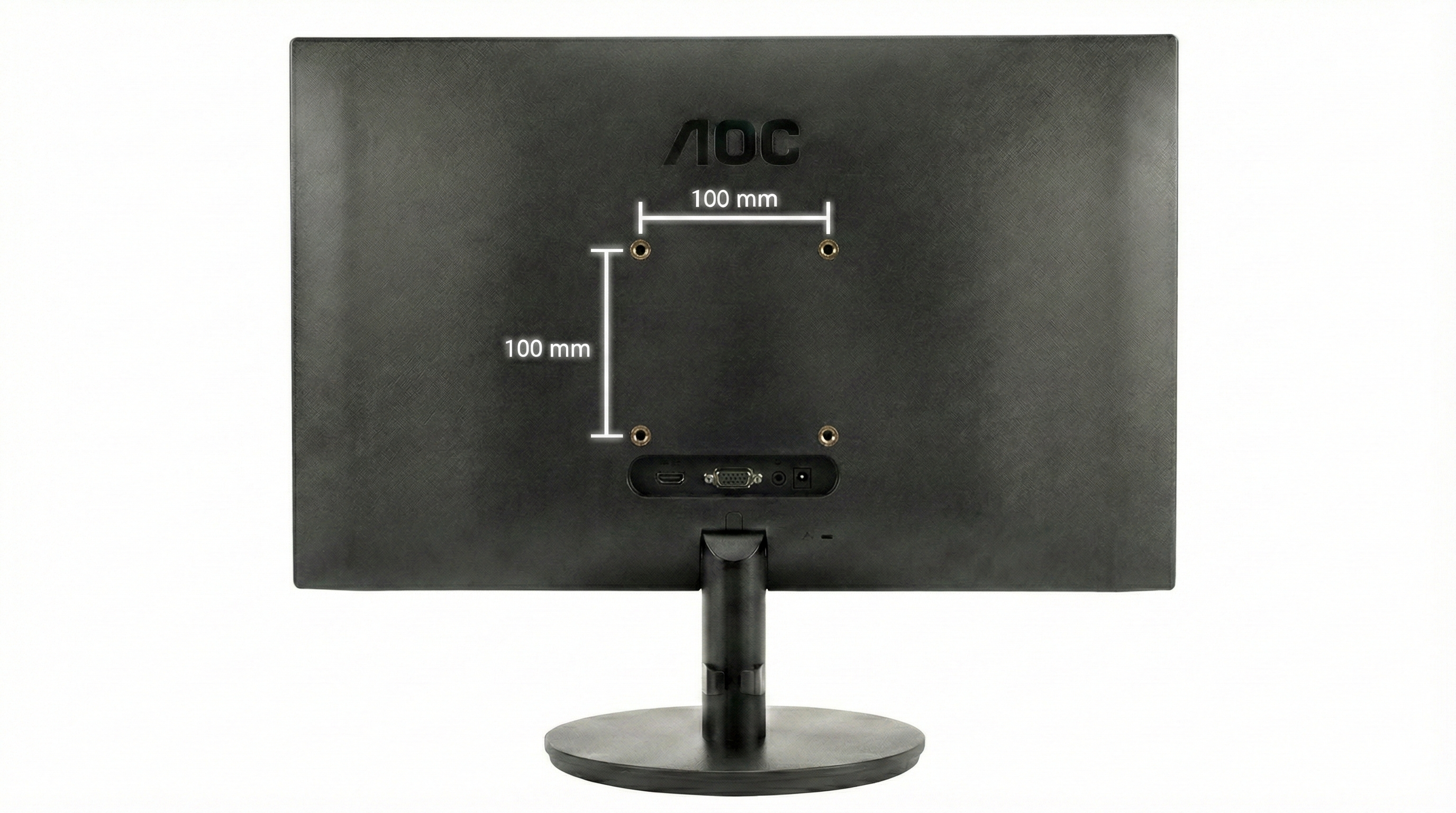
How to measure correctly:
  1. Measure the horizontal distance of the thread centers (in mm).
  2. Measure the vertical distance of the thread centers (in mm).
  3. Result: Horizontal x Vertical = your VESA standard (e.g., 100 x 100).
📄
Measuring without a tape measure? Printable VESA template here.
Open PDF ↓
Technical drawing: Measure VESA distance
⚠️ No VESA holes available?

For Apple iMac, Samsung Odyssey, or HP Slim models, the VESA grid is often missing. For this, you need a VESA adapter.

Go to Adapter Finder ›

Step 2: VESA Standard Table (All Standards)

Compare your measurement with our VESA table. This classification also determines the required screw size (M4, M6, or M8) for your wall mount or desk mount.

Standard Horizontal Vertical Thread (Ø)
VESA 75 x 75 75 mm 75 mm M4
VESA 100 x 100 (PC Standard) 100 mm 100 mm M4
VESA 100 x 200 100 mm 200 mm M4
VESA 200 x 100 200 mm 100 mm M4 / M6
VESA 200 x 200 200 mm 200 mm M6 / M8
VESA 200 x 300 200 mm 300 mm M6 / M8
VESA 200 x 400 200 mm 400 mm M6 / M8
VESA 300 x 200 300 mm 200 mm M6 / M8
VESA 300 x 300 300 mm 300 mm M6 / M8
VESA 400 x 200 400 mm 200 mm M6 / M8
VESA 400 x 300 400 mm 300 mm M6 / M8
VESA 400 x 400 400 mm 400 mm M6 / M8
VESA 500 x 400 500 mm 400 mm M6 / M8
VESA 600 x 200 600 mm 200 mm M6 / M8
VESA 600 x 400 600 mm 400 mm M8
VESA 800 x 400 800 mm 400 mm M8
VESA 800 x 600 800 mm 600 mm M8
💡
Caution with Curved Monitors

With curved monitors, the center of gravity moves forward. Due to the increased leverage effect, we urgently recommend a mount with a higher load capacity reserve so that the screen does not sag.
Read more in the technical guide ›

Step 3: Choose the Right Monitor Mount

Choose the appropriate category based on your measured VESA standard:

Monitor Desk Mount
Desk Mounts For PC Monitors
Suitable for:
VESA 75x75 & 100x100

Ergonomic at the desk (clamp).

View models ›
Monitor Wall Mount
Wall Mounts PC Monitors & Small TVs
Suitable for:
VESA 75x75 to 200x200

Space-saving wall mounting.

View models ›
TV Wall Mount
TV Mounts For TVs
Suitable for:
From VESA 200x200

Heavy-duty systems for large standards.

View models ›

Frequently Asked Questions (FAQ)

What does VESA actually mean? +

VESA stands for "Video Electronics Standards Association". This is the international standard for attaching screens to mounts. If the monitor and mount have the same VESA standard (e.g., both 100x100), they fit together mechanically.

How do I measure VESA on the monitor? +

Measure the distance of the four threaded holes on the back in millimeters. Determine the horizontal (width) first and then the vertical distance (height). A distance of 100mm width and 100mm height corresponds to VESA 100x100.

Which screws do I need (M4, M6, M8)? +

For VESA 75 and 100 (standard PC monitors), M4 screws are standard. For larger TVs (from VESA 200), M6 or M8 screws are usually used. Ensure that the screw is not too long to avoid damaging the electronics.

My monitor has no holes - what now? +

You need a model-specific VESA adapter. For models without VESA standard (e.g., many Apple iMacs or Samsung Curved monitors), there are special adapters that create an artificial VESA mount so you can still use a monitor arm.

Can the monitor be heavier than specified? +

No, the maximum weight of the mount must not be exceeded under any circumstances. With gas spring arms, the monitor would otherwise sag, and with rigid mounts, there is a risk of breakage.

What is more important: inch size or weight? +

Weight is the decisive criterion. The inch specification is only a guideline. A 34-inch monitor can be mounted on a "up to 27 inch" mount as long as it does not exceed the maximum weight and the VESA standard fits. Always plan for a weight reserve, especially with deep or curved monitors.

What if the VESA plate doesn't fit in the recess? +

Use spacers (standoffs) and longer screws. This is a common problem with gaming monitors ("Recessed VESA"). With spacers, you bridge the recess in the housing so that the mount sits securely.

Can I use VESA 75 on a VESA 100 mount? +

Yes, almost all modern mounts have a combo plate. This has holes for both standards (75x75 and 100x100). Simply use the inner holes for your VESA 75 monitor.

Can I mount a wall mount on drywall (Rigips)? +

Caution, drywall anchors are often not sufficient for swivel arms. Due to the leverage effect, enormous forces are generated. We recommend mounting only on solid masonry (concrete/brick) or directly into the studs (wood beams) of the wall.

Do I lose my warranty when using an adapter? +

No, usually not. Our adapters are non-invasive. They are mostly clicked or screwed into the place of the original stand without damaging the housing. Reversal is possible at any time.

Your cart
Subtotal: 0,00 €
Fingerprint
Chat on Whatsapp

Sign up to our newsletter

for important news, great offers and insights from the VESA Adapter Team

vesa-adapter.com
vesa-adapter.com
3idee SARL
19, Rue de Bitbourg
1273 Luxembourg
Luxembourg
info@vesa-adapter.com
Live Chat

Support

  • Return
  • Goods not arrived
  • Product damaged
  • FAQ
  • Assembly instructions

Information

  • About us
  • Shipping
  • Privacy policy
  • Our Terms & Conditions
  • Imprint
  • Right of withdrawal

Find it fast

  • Acer
  • AOC
  • ASUS
  • BenQ
  • CSL
  • DELL
  • HP
  • HP Omen
  • Huawei


  • Koorui
  • Lenovo
  • LC-Power
  • MSI
  • ODYS
  • Philips
  • Samsung
  • Viewsonic
  • Xiaomi
© 2026 - 3idee Sàrl
Paypal AmazonPay klarna Visa Mastercard American Express Discover Diners Club Carte Bancaire JCB Union Pay eps iDeal bancontact Przelewy24

Hello, welcome back

Login to manage your account.

Forgot passwort?
No account yet? Register now

Welcome to vesa-adapter.com

Complete the form to create an account

You already have an account? Login

Forgot passwort?

Enter your email address and we will send you an email with your new password.

You remember again? Login